Skip to content

Customer Service

+1 888 812 6287

Cart
0 items

XPLORE 10 Mapping and Network Planning Guide
by Sulman Bukhari 14 Sep 2026
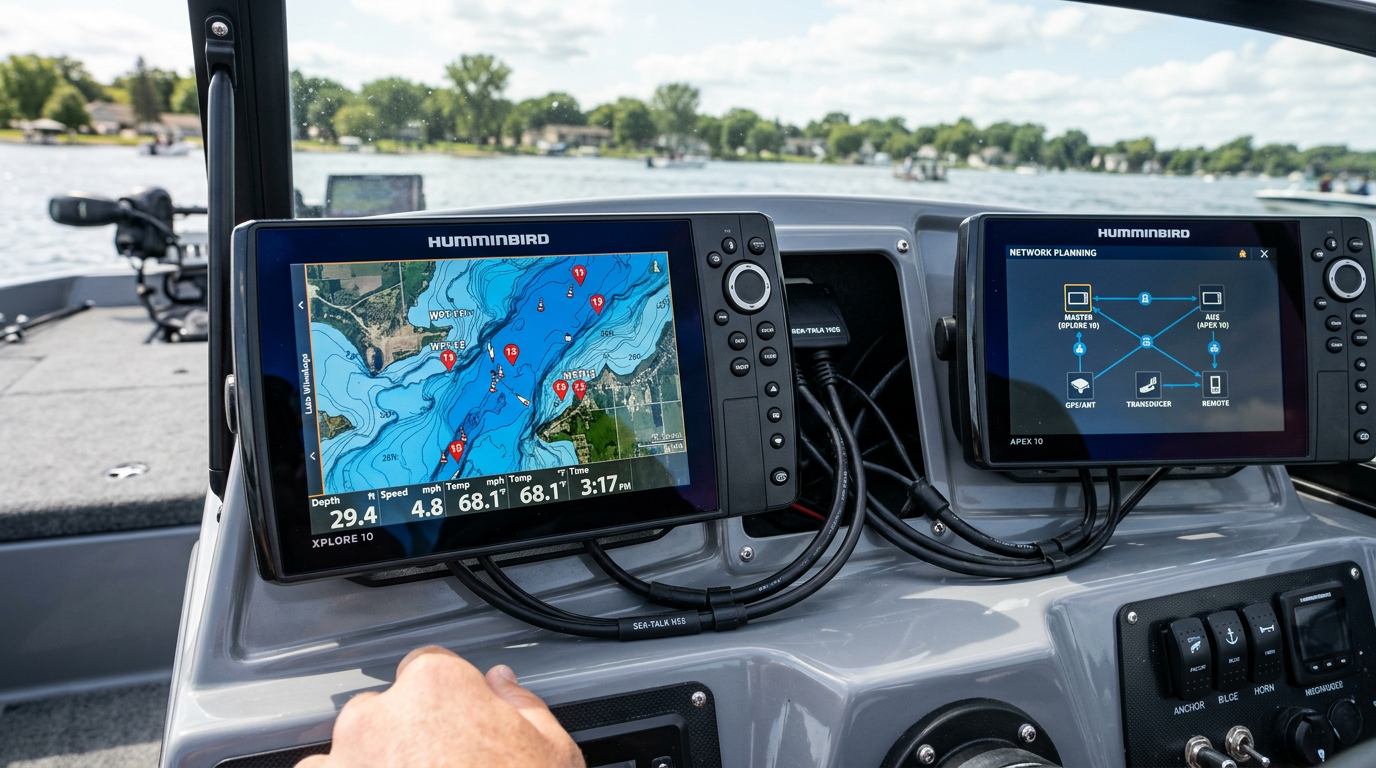
Humminbird XPLORE 10 fish finder displaying a lake map with waypoints connected via network cables to another marine display

XPLORE 10 Mapping and Network Planning Guide

Getting the most from an XPLORE 10 network compatibility setup means planning your map selection, waypoint workflow, Ethernet and NMEA 2000 connections, and One-Boat Network integration before you finalize your installation — not after. This guide breaks down each piece so your XPLORE 10 works with the rest of your electronics from day one.

Choosing the Right Map Data

Confirm which mapping data — built-in basemap, downloadable charts, or a compatible third-party map card — your specific XPLORE 10 MPN supports before relying on it for navigation. Not every configuration ships with the same mapping package, so verify coverage for the water you actually fish before you're on the water.

Planning Your Waypoint Workflow

Think through how you'll mark, organize and return to waypoints — whether that's structure, docks, or productive fishing spots — since a clear waypoint naming and management habit from the start makes a growing waypoint list far easier to use months into ownership.

Ethernet Connections

If you're linking the XPLORE 10 to another Humminbird display or sharing sonar and chart data across units, confirm your Ethernet cabling and port configuration are compatible before installation. Running or reusing Ethernet cable during your initial install is far easier than retrofitting it later.

NMEA 2000 Integration

NMEA 2000 lets your XPLORE 10 communicate with other compatible marine electronics such as engine data, autopilot or additional sensors. Confirm your boat's existing NMEA 2000 backbone and connector type before assuming a direct plug-and-play connection.

One-Boat Network Setup

One-Boat Network allows compatible Humminbird and Minn Kota products to share control and data across your boat. If you're running a trolling motor or additional accessories on this network, confirm compatibility and firmware requirements for each connected device before finalizing your XPLORE 10 configuration.

Compatible Accessory Connections

Review any additional accessories you plan to connect — remote controls, additional sensors, or auxiliary displays — and confirm each is compatible with your XPLORE 10's network setup before you commit to a final wiring plan.

Key Takeaway: Confirm mapping data, waypoint workflow, Ethernet, NMEA 2000 and One-Boat Network compatibility together before finalizing your XPLORE 10 installation to avoid rewiring later.

Network Planning Checklist

  • Confirm mapping data and chart coverage for your fishing waters
  • Plan a waypoint naming and organization system before installation
  • Run or verify Ethernet cabling for multi-display setups
  • Check NMEA 2000 backbone and connector compatibility
  • Confirm One-Boat Network compatibility for connected accessories

Frequently Asked Questions

Do I need Ethernet cabling if I'm only installing one XPLORE 10 unit?
No — Ethernet matters primarily when linking multiple displays or sharing data across units. A single-unit setup doesn't require it.

Can I add NMEA 2000 devices after my initial XPLORE 10 installation?
Generally yes, provided your NMEA 2000 backbone has available connection points — confirm capacity before adding new devices.

Is One-Boat Network required to use the XPLORE 10?
No, it's only necessary if you're connecting compatible Minn Kota or Humminbird accessories for shared control and data.

Need help planning your XPLORE 10 network setup? Contact our team for guidance.

Prev post
Next post

Thanks for subscribing!

This email has been registered!

Shop the look

Choose options

Recently viewed

Edit option
Terms & conditions
1. Terms of Use By accessing or using this website, you agree to comply with and be bound by these Website Terms and Conditions of Use, all applicable laws, and regulations, and acknowledge that you are responsible for ensuring compliance with any applicable local laws. If you do not agree with any of these terms, you are prohibited from using or accessing this site. The materials on this website are protected by copyright and trademark law, and all rights are reserved. 2. Use License Mariners Warehouse grants you permission to temporarily download one copy of the materials (information or software) on its website for personal, non-commercial, transitory viewing only. This is the grant of a license, not a transfer of ownership, and under this license, you may not: Modify or copy the materials; Use the materials for any commercial purpose or public display (commercial or non-commercial); Attempt to decompile or reverse-engineer any software contained on Mariners Warehouse website; Remove any copyright or proprietary notations from the materials; or Transfer the materials to another person or “mirror” them on any other server. This license shall automatically terminate if you violate any of these restrictions and may be terminated by Mariners Warehouse at any time. Upon termination of your viewing of these materials or upon termination of this license, you must destroy any downloaded materials in your possession, whether in electronic or printed format. 3. Disclaimer The materials on Mariners Warehouse’s website are provided “as is.” Mariners Warehouse makes no warranties, either expressed or implied, and hereby disclaims and negates all other warranties, including, but not limited to, implied warranties or conditions of merchantability, fitness for a particular purpose, or non-infringement of intellectual property or other violations of rights. Furthermore, Mariners Warehouse does not warrant or make any representations concerning the accuracy, likely results, or reliability of the use of the materials on its website, or otherwise relating to such materials, or on any sites linked to this site. 4. Limitations of Liability In no event shall Mariners Warehouse or its suppliers be liable for any damages, including but not limited to, damages for loss of data or profits, or due to business interruption, arising out of the use or inability to use the materials on Mariners Warehouse website, even if Mariners Warehouse or an authorized representative has been notified orally or in writing of the possibility of such damage. Because some jurisdictions do not allow limitations on implied warranties, or limitations of liability for consequential or incidental damages, these limitations may not apply to you. 5. Revisions and Errata The materials appearing on Mariners Warehouse website could include technical, typographical, or photographic errors. Mariners Warehouse does not warrant that any of the materials on its website are accurate, complete, or current. Mariners Warehouse may make changes to the materials contained on its website at any time without notice. However, Mariners Warehouse makes no commitment to update the materials on its website. 6. Links to Third-Party Sites Mariners Warehouse has not reviewed all of the sites linked to its website and is not responsible for the contents of any such linked sites. The inclusion of any link does not imply endorsement by Mariners Warehouse of the site. Use of any linked website is at the user’s own risk. 7. Modifications to Site Terms of Use Mariners Warehouse may revise these Terms of Use for its website at any time without notice. By using this website, you agree to be bound by the then-current version of these Terms and Conditions of Use. 8. Governing Law Any claim relating to Mariners Warehouse website shall be governed by the laws of the State of Florida, without regard to its conflict of law provisions.

Choose options

this is just a warning
Login
Shopping cart
0 items